
Design System Ops — Beyond Components
Maintain, measure, and mature your design system infrastructure

In DesignOps, the quiet periods are when systems get stronger or slowly fall apart. I was so excited yesterday watching our designer prove how much you can achieve in peacetime. Our system designer built a proof-of-concept usage guidelines site directly from Figma Sites.
The kicker, the POC site was built in a matter of hours.
No new assets. No wheel reinvention. Just smart reuse of existing files, a solid IA, and a few pops of brand guidelines to make it shine. The result? A living documentation site that any of us can contribute to—and publish—without leaving Figma.
Ten years ago, this would’ve taken months. Now, with AI-powered tools and structured Ops workflows, it’s possible in a single afternoon. That’s the power of peacetime system operations.
AI Changes Everything (Including System Ops)
In the era of AI, development goes faster. What we just witnessed is proof: in the past, producing a documentation site would have taken months. But with a combination of Figma (Figma Make, Figma Site), existing documentation, and smart reuse, they were able to produce this in a matter of hours.
To us, AI is not here to replace our jobs, but to help us do our job better and faster. Peacetime is the best time to maintain systems. So this week, we'll look at peacetime system operations.
I don't qualify to talk about design system theory. But Ops' perspective adds unique value. Especially in small teams, design systems tend to roll up to ops as we look horizontally across the organization.
Design System Ops: Beyond the Components
Design systems aren't just about tokens and Figma libraries. During peacetime, systems become product infrastructure. Design systems are a universally recognized crucial element to the success of the product. Everyone agrees that a solid design system will save time and promote consistency. But in reality, it is mostly neglected. This is when multipliers like DesignOps become key to keeping them relevant and adopted.
But it is not without challenge.
Structure
Despite the size of the design team, mature organizations are likely to have a team of system designers, potentially working on multiple aspects of design systems. Team size also matters. When there is a dedicated design system team, it is beneficial to have a Design Program Manager who is dedicated to supporting the team.
In larger organizations (50+ designers):
Dedicated system designers focus on different domains (visual, interaction, content)
Design Program Manager coordinates between the system team and the product teams
Clear governance structure with a design system council or a steering committee
Regular syncs between system maintainers and consuming teams
In smaller teams (10-25 designers):
System designers potentially report to the operational leader, aligning with horizontal support across the entire organization
DesignOps lead often wears the "system program manager" hat
More informal governance through weekly design critiques and team discussions
System work often splits between dedicated time and embedded work within product teams
Budget
Investing in design systems is challenging. On paper, all leaders understand the importance and benefit of having a design system. However, in reality, it is hard to get funding. As design systems are more than just Figma components, they are closely tied to engineering practice.
The funding reality:
Either fund design system engineers within the design organization, or have engineers dedicated to building design systems
The common model of engineers doing it "on the side" will not work - product shipping will always trump system building
Budget for tooling, documentation platforms, and potentially external consultation for system strategy
Consider the hidden costs: maintenance, training, migration efforts, and ongoing governance time
Making the business case:
Calculate time saved per designer per week when using vs. building from scratch
Measure consistency improvements through design QA metrics
Track engineering velocity improvements when using system components
Documented reduced design debt and fewer post-launch fixes
Peacetime Design System Operations
Now comes our discussion of strengthening the peacetime design system operations. From an operational perspective, when you have a small design system in place, what are the design system's peacetime operational tasks?
Here's what peacetime system ops actually look like:
Contribution models
How do teams request new components or modifications?
Design intake forms that capture essential information about use case, frequency, and impact data. Create contribution guidelines with examples of well-documented requests that make it easy for teams to submit quality proposals. Hold regular office hours for discussing potential contributions and provide clear timelines for review and implementation of approved requests. Establish recognition and credit systems for teams that contribute back to the system—this encourages ongoing participation and shared ownership.
Usage audits
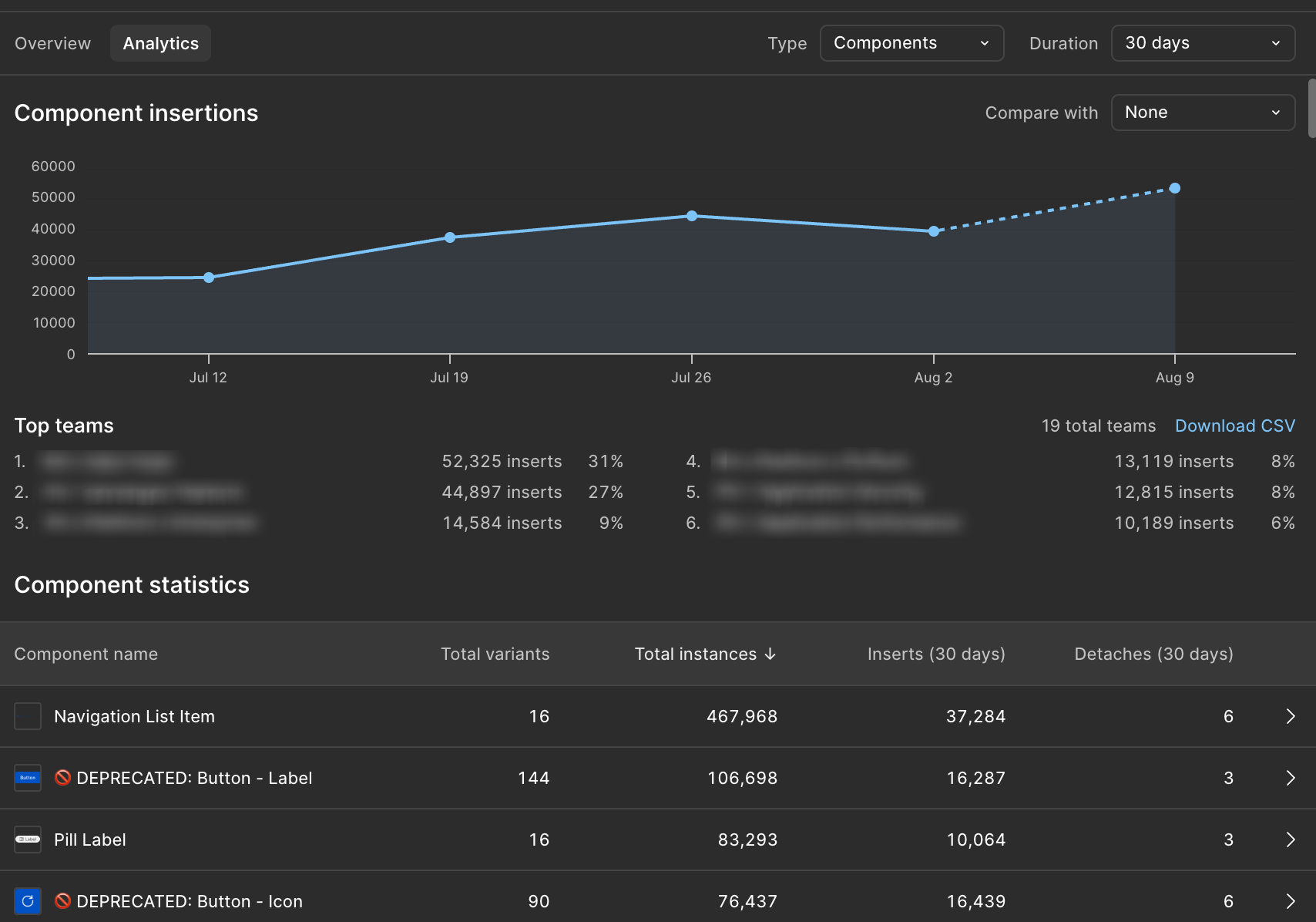
You can build your own automated reporting system. Or use a product such as Omlet.dev to refine your analytics. But to start, if you are on the Figma Enterprise plan, Figma’s Library Analytics feature does the basic job for you. At least gets you started. Figma's Library Analytics feature (available for Organization and Enterprise users) provides powerful insights into how your published libraries are actually being used.
You can track component adoption, styles, and variables directly within Figma, seeing exactly how many files and teams are using specific components. This data helps identify unused components that may need removal or updates, and allows you to compare library usage across different versions over time. Enterprise customers can use the API to extract detailed design system usage data for external analysis and visualization.
Use Figma's global search feature to find all instances of components across different files, and leverage plugins like Instance Finder to locate hidden or removed instances that might be creating technical debt.
For teams using Dev Mode, Code Connect bridges the gap between design components and their corresponding code implementations, giving engineers visibility into where components are used in the actual codebase. Supplement this automated tracking with regular conversations with designers and developers about system pain points—sometimes the most valuable insights come from understanding why certain components aren't being adopted rather than just measuring what is.
Documentation upkeep: Keeping guidelines current and accessible
Establish regular documentation review cycles with assigned owners for each section to ensure that all documentation remains current. Collect user feedback on the usefulness and clarity of the documentation through surveys and usage analytics. Update onboarding documentation based on new team member experiences and pain points. Continuously improve search and findability based on how people actually use the documentation. Provide multi-format documentation including visual examples, code snippets, and video walkthroughs to accommodate different learning styles.
Regular health checks on adoption and implementation quality
The key metric isn't just adoption—it's adoption vs. alignment. Are teams using the system? And when they use it, are they using it correctly?
Adoption metrics help you understand reach and usage patterns. Track the percentage of new designs using system components and measure time-to-market improvements when teams use existing components versus building custom solutions. Monitor designer satisfaction scores with system tooling and documentation, and measure engineering velocity improvements when implementing system components versus custom alternatives.
Alignment metrics focus on the quality and consistency of implementation. Track quality scores for system implementation through design QA findings and measure consistency scores across different product areas. Monitor accessibility compliance rates for system versus non-system components, and measure user experience impact through task completion rates and error reduction when system components are properly implemented.
Peacetime System Opportunities
What our team accomplished today is a perfect example of peacetime system work:
Rapid iteration using existing assets
Documentation modernization without reinventing content
Tool experimentation (Figma Make, Sites, and other AI tools approved by your company) experimentation during low-pressure periods. Designers can do it, design system designers can do it. Ops can also experiment, collaborate, and share ideas
Foundation building for future contribution workflows
This is the kind of work that's impossible during crunch time but compounds massively when you invest in it during calm periods. With AI tools, the opportunities and experiments become a system reality.
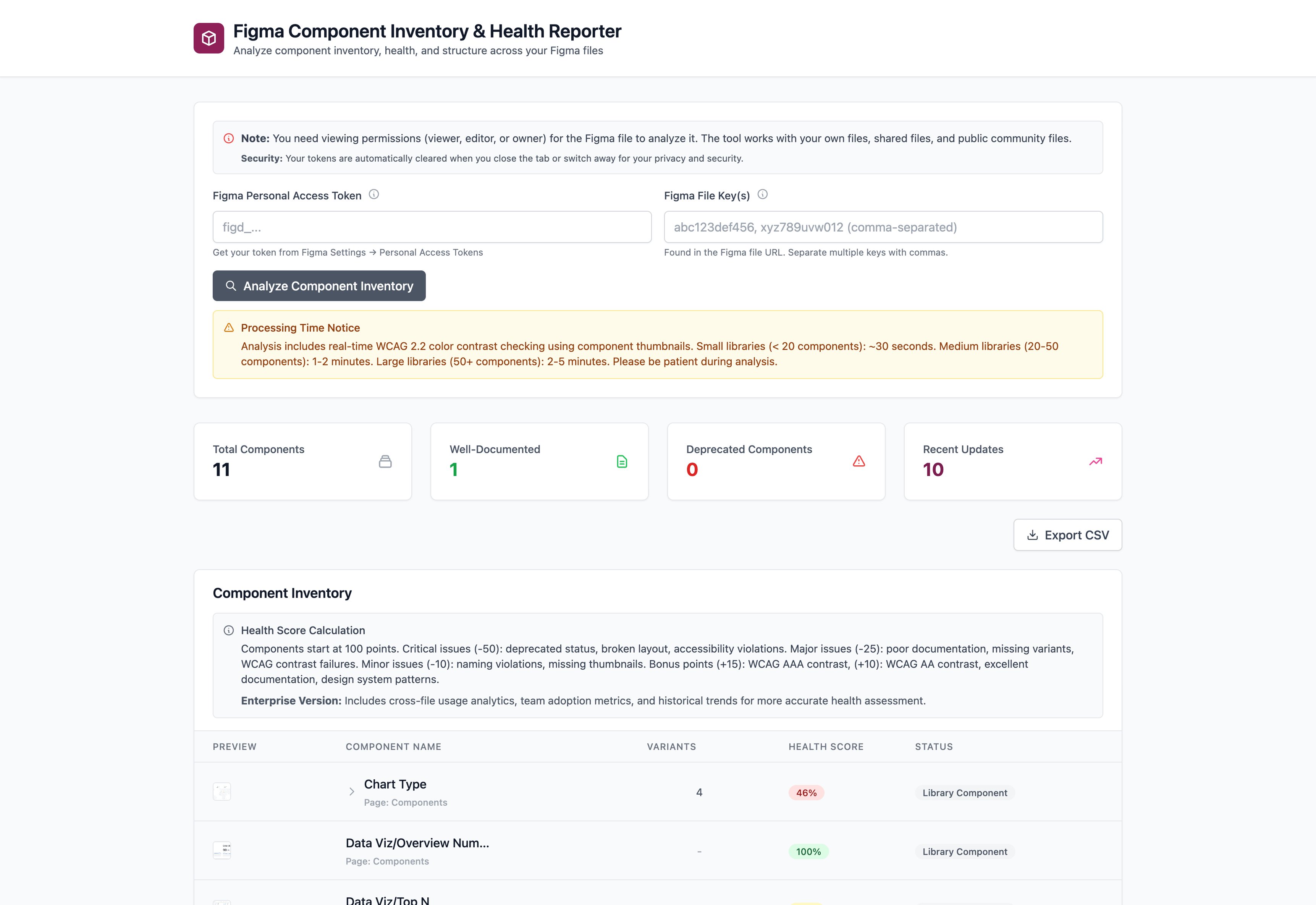
📥 If it makes your life easier, I built a quick reporting tool pulling basic info out of Figma. Check it out HERE.
Questions for you: What's your biggest design system ops challenge? Are you struggling with adoption, governance, or something else entirely? Comment in the app and let the community work on it together.