
From Intake to Insights: Streamlining the Research Request Workflow
Because good research starts with a good ResearchOops

This month, we’re diving into Research Operations—or ResearchOps for short.
If you're newer to the topic, the Nielsen Norman Group has a great primer to start. I highly recommend “Research That Scales” by Kate Towsey for a deeper dive. It’s one of the most comprehensive guides to building research operations that work. Our ResearchOps team read it recently and realized we’d already been practicing many of the steps, just without the formal language. The book also gave us fresh perspectives and ideas we hadn’t considered before. We’re big fans.
When people think about ResearchOps, they often think about participant recruiting. And yes, that’s part of it—but it’s far from the whole picture.
If you treat ResearchOps like a product and apply a product lifecycle lens, the journey might look something like this:
👉 Intake → Study Building → Recruiting → Research Conducted → Synthesis → Reporting
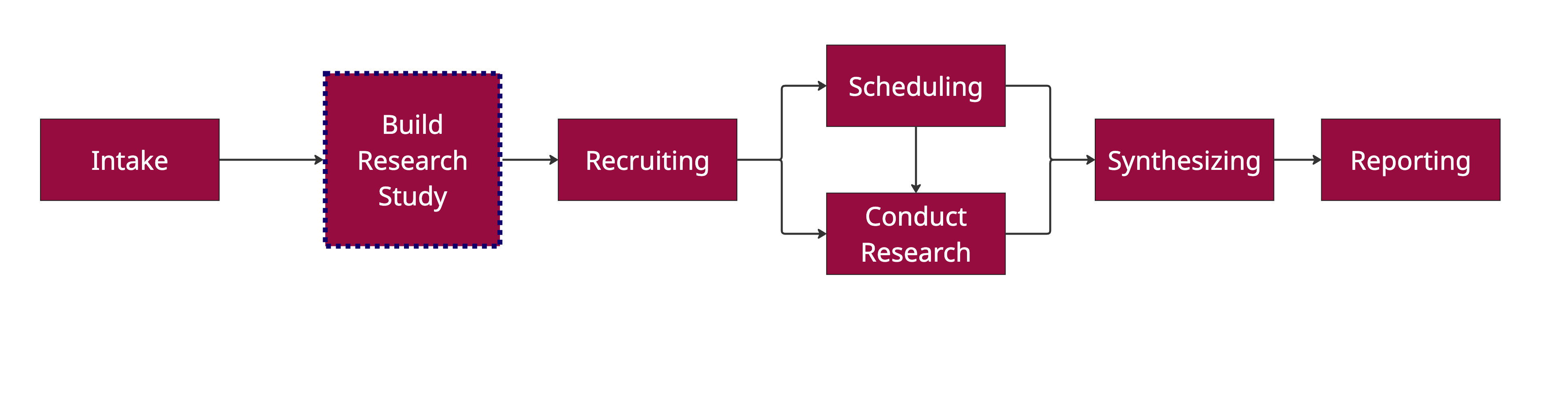
Simple?
But when you zoom in, each step has operational complexities and decision points that go far beyond scheduling participants or sending out surveys.
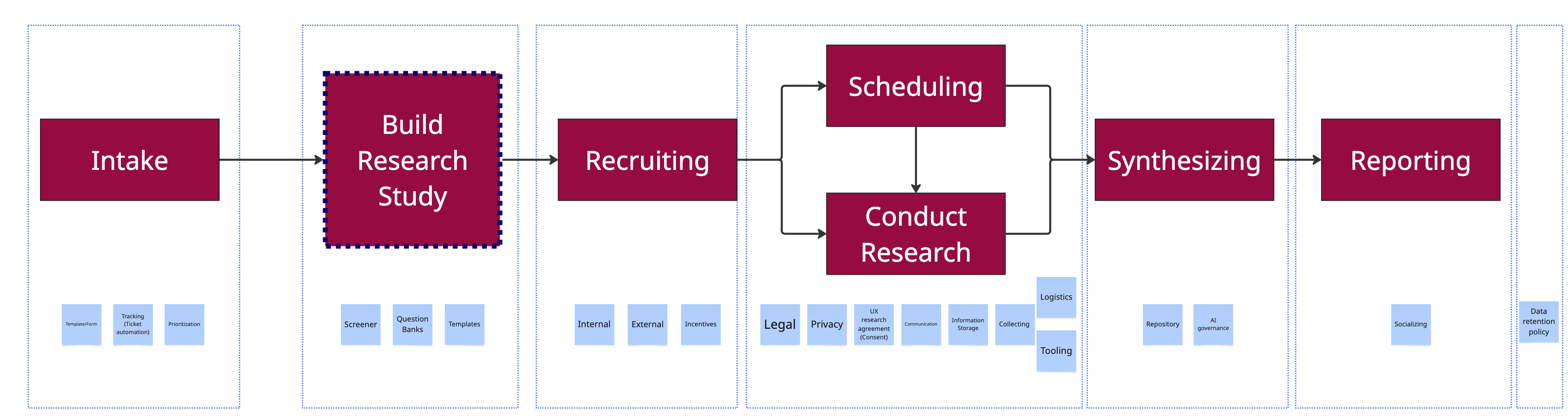
Starting with the first step: Intake. Let’s dig into it.
🔍 Standardizing the Research Intake Process
The intake moment sets the tone for the entire research workflow. Done well, it aligns expectations, streamlines planning, and makes life easier for everyone involved. Here’s how we approach it:
📝 What We Collect Upfront
We use a research intake form (ours is in Jira, but any form tool works) structured around three key areas:
Project Information
Start and end dates, requester details, product area, business impact, and user value.Research Details
What’s being tested, study description, target audience, research format (e.g., surveys, moderated sessions), and platform preferences.Operational Support Needs
Type of study (moderated/unmoderated), recruitment type (customers vs. non-customers), demographics, product focus, and estimated participant count.
This section also lists common research ticket steps to help researchers and Ops decide on the next step best action during triage.
🧭 Prioritization with Daily Triage and Tracking
Once submitted, the intake form kicks off a Jira ticket, which is automatically routed to the ResearchOps team. Our UX researchers and ResearchOps partners hold a 15-minute daily standup to review incoming requests.
We tag each request based on the operational model needed:
Self-Service
Designers run the study using templates, with guidance from researchers and Ops.Hybrid
Ops handles recruiting and logistics. Designers build and conduct the study by consulting with UX researchers and synthesizing results using researcher-built templates.Full-Service
Researchers and Ops collaborate closely to run complex studies end-to-end.
Since our research team is small, most tickets are lean self-service, but ResearchOps still handles all recruiting tasks, regardless of model.
From there:
Tickets are triaged and assigned to the appropriate person—researcher, designer, or Ops.
Sub-tickets are created as needed (e.g., recruiting participants, Designing study, code study, etc.).
Each ticket is linked to broader Epics or SHIP tickets.
Statuses are kept updated so stakeholders can track progress without needing constant check-ins.

🔧 Tips for Adapting This Model
📥 Visit the UX research intake form page
Keep your form lightweight but structured.
Use dropdowns and checkboxes where possible to reduce fatigue and standardize inputs.Customize your operational model.
Not every team needs all three modes—start with what fits your team size and maturity.Build automation early.
Even simple auto-routing or tagging based on inputs can save hours each week.Make triage a habit.
A quick daily sync helps reduce bottlenecks and build shared ownership.
Intake is just one piece of the puzzle.
Over the rest of the month, I’ll be sharing a few more posts on how we’ve tackled:
Research Budgeting & Incentive Tracking
Consent & Privacy: Lightweight Blurbs for Surveys and Moderate Studies
Research Repositories for Small Teams
If there’s a specific topic you’d like to see, feel free to reply or leave a comment!